This website provides general lifestyle information only and is not professional or medical advice.

Health & Movement

Small daily habits for vision, posture breaks, and sustainable work rhythms.

Person taking a standing stretch break near home office desk

Desk-Friendly Movement Breaks

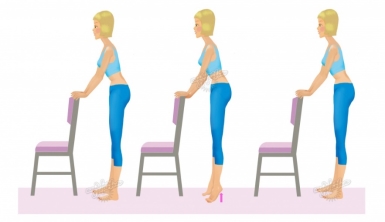
Movement does not require a gym block between meetings. Shoulder rolls, chin tucks, and standing hip extensions take under two minutes and interrupt static loading. Try standing when you read email on mobile, or walk during audio-only calls. Research on sedentary behaviour suggests breaking up sitting time may support circulation and perceived energy, even when total exercise minutes stay constant. Pair breaks with habits you already have—kettle boiling, printer checks, or pet care. Consistency beats intensity: three brief breaks per hour often feel more achievable than one long walk you skip on busy days.

Vision & Screen Habits

Digital eye strain often links to blink rate, uncorrected refractive error, and glare—not the screen alone. The 20-20-20 habit reminds you to shift focus to a distant object regularly. Match screen brightness to the wall behind the monitor; a bright display in a dark room increases contrast fatigue. Position screens to minimise window reflections. If you use progressive lenses, you may need a lower monitor or a dedicated pair for computer distance—discuss with your optometrist. Artificial tear drops can help dry office air when heating or cooling runs often.

Morning

Quick ambient light check; open blinds partially before starting deep work.

Midday

Step outside for natural light if possible—helps circadian rhythm and focus reset.

Evening

Reduce overhead brightness; warm desk lamps for admin tasks after sunset.

Structuring Your Workday

Block calendar time for focus, admin, and movement just as you block meetings. Australians across multiple time zones often juggle school pick-ups—build buffer minutes rather than back-to-back video calls. Eat away from the keyboard when you can; it separates mental modes and reduces crumb-filled keyboards. Hydration supports concentration; keep a bottle at desk height so you do not hunch to reach it. End-of-day shutdown rituals—closing tabs, listing tomorrow's top task—reduce evening rumination and support sleep quality, which feeds next-day posture awareness.

Interactive Desk Break Coach

Plan micro-breaks before fatigue builds—use the timer and checklist below during your work session.

Long stretches at a desk load the same tissues repeatedly: neck extensors, hip flexors, and forearm muscles that operate mouse and keyboard. An effective home-office rhythm alternates focused work with short, deliberate resets. Many Australian WFH guides suggest changing posture or standing at least once every 30–45 minutes; the exact interval matters less than keeping it predictable so breaks actually happen. This coach helps you choose an interval, run a countdown while you work, and receive a specific two-minute action when the timer ends—shoulder mobility, a vision reset, hydration, or a brief walk.

The 20-20-20 vision rule fits naturally between movement breaks: every twenty minutes, look at something roughly six metres away for twenty seconds. Pair that with standing for phone calls, rolling shoulders backward ten times, or marching on the spot beside your desk. Tick each action in the checklist when you complete it; your session tally saves locally in your browser (not sent anywhere). If you wear progressive lenses, lower the monitor slightly and confirm screen distance with your optometrist. None of this replaces personalised advice—use the tool as a nudge, not a prescription.

Break timer

Typical range for desk workers
Break focus
30:00

Breaks completed today: 0

Quick session checklist

0 of 5 actions ticked this session

Clear checklist

FAQs

How long should I sit without moving?
Many ergonomics resources suggest changing posture at least every 30–45 minutes. Even shifting weight, standing for a call, or walking to refill water counts.
Do blue-light glasses replace breaks?
No. Breaks, proper correction, and lighting adjustments remain central. Glasses may help some individuals; they are not a substitute for regular eye rest.
Can I exercise at my desk chair?
Gentle mobility yes; vigorous exercise no. Use chair arms for seated twists only if the chair is stable and rated for your weight.

Health & Safety Guidelines

General awareness for home workers—not a substitute for professional assessment.

Clear trip paths before pacing during calls.
Wipe spills on hard floors immediately—chairs roll fast on wet surfaces.
Know how to reach your employer's WHS contact if equipment is employer-provided.
Review furniture setup